Configuration
LINK2AI.Trust is configured through the Portal web interface. Each Project has its own application, models, module configuration under Runtime Analysis, and API keys.
Projects belong to an Organization. For organization setup, folders, members, and roles, see Organization.
API Keys
To authenticate with the Controller API you need an API key scoped to a project. Create one in the Portal under Settings → API keys.
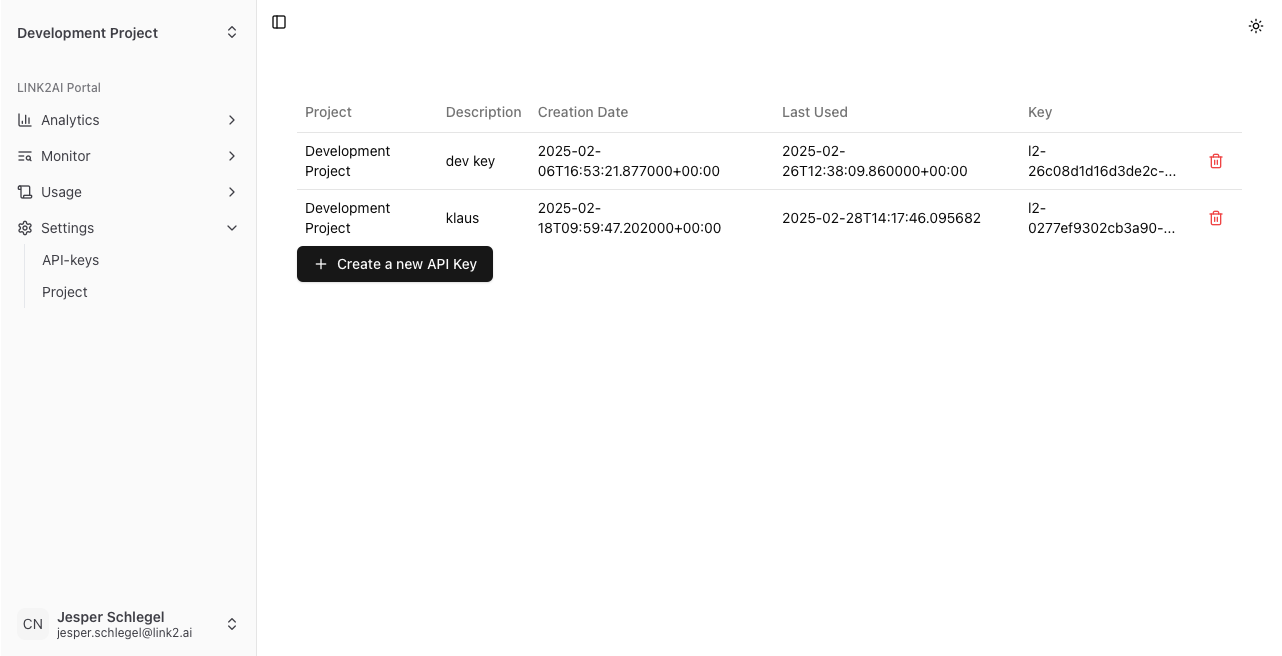
Click New API key, enter a description, and copy the key immediately — it is shown only once.
Keys take the form l2-<key_id>-<secret> and are passed as a Bearer token (Analysis API) or in the LINK2AI-API-KEY header (proxy mode). See Authentication.
Models and Providers
Several LINK2AI.Trust features — including analysis modules, red teaming, and the playground — need to call an LLM on your behalf. You configure which LLM services are available to the platform through Providers and Models, both found under Settings → Models.
Providers
A provider represents an OpenAI-compatible API endpoint. Any service that exposes an OpenAI-compatible API (OpenAI, Azure OpenAI, Anthropic via compatibility layers, local models via Ollama, LM Studio, etc.) can be added as a provider.
| Field | Description |
|---|---|
| Name | A display name for this provider (e.g., "OpenAI", "Azure EU", "Local Ollama") |
| Base URL | The API endpoint, e.g., https://api.openai.com/v1 |
| API Key | The authentication token for the provider |
To add a provider, go to Settings → Models and click Add Provider. When editing a provider, leave the API key blank to keep the existing one.
Models
A model ties a specific model identifier to a provider. You can add multiple models from the same provider.
| Field | Description |
|---|---|
| Display Name | A display name shown in the UI (e.g., "GPT-4o mini") |
| Model ID | The exact model identifier sent in API requests (e.g., gpt-4o-mini) |
| Provider | Which provider this model belongs to |
Models come in two kinds, each listed in its own card:
| Kind | Use |
|---|---|
| General-purpose models | Usable anywhere a model can be picked: the Playground, module configuration, red teaming and the model of a System prompt + model application. |
| Application models | A model built for one specific application, reached through a provider's API under one model name. It is the endpoint of a Chat completions endpoint application. |
To add a model, click Add Model in the card of its kind. To change the kind later, edit the model and toggle General-purpose model. In model pickers, general-purpose models are marked · General purpose. The check button next to a model sends it a test request and shows whether and how fast it answers.
Deleting a provider also stops all models using it from working.
Included models
On the LINK2AI cloud, every project can use a selection of ready-to-use models without configuring a provider. They are listed under General-purpose models with the badge Included, cannot be edited or deleted, and their usage is charged in credits.
An included model marked Deprecated will be removed soon; choose another model wherever it is selected. Once a model is removed, features that used it fall back to a comparable included model.
Where Models Are Used
Configured models are available across all features that require an LLM:
- Application — the model of a System prompt + model application, and the Context model that proposes or probes the Application Context
- Instruction Adherence module — the Graph builder model that builds and tests the decision graphs
- Guardrails module — the model used to evaluate input and output guardrail conditions
- Off-Topic Detection module — the model behind the Suggest button for topic and edge topics
- Red Teaming — the adversarial model that generates and rewrites the attacks and judges the responses
Each feature lets you select a specific model independently, so you can use a faster or cheaper model for analysis and a more capable model for red team generation. The Playground always talks to the application itself. Harmful Content, Malicious Intent, Off-Topic Detection and the runtime evaluation of the adherence graphs run on models served by LINK2AI.Trust and need no model configuration.
Cache Embedding Provider
Under Settings → Project, the Semantic cache card lets you select an Embedding provider. The controller uses it to generate embeddings for semantic request caching, which modules with a cache_similarity_threshold need. Flush cache discards the cached results.
Application
An Application describes the LLM app a project tests and monitors. Every project has exactly one, created with the project and removed with it, and it is the target Red Teaming, the Playground and the Instruction Adherence module all work against.
Edit it under the Application entry in the sidebar. A new project's application starts out unfinished: give it a name, choose its type and fill in the fields of that type before using it.
Common fields
| Field | Description |
|---|---|
| Name | A display name for the application (e.g. "Coffee Sales Assistant"). |
| Description | What the application does. |
| Type | The kind of application: System prompt + model, Chat completions endpoint or Chatkit server. |
System prompt + model
The application is a general purpose model steered by a system prompt.
| Field | Required | Description |
|---|---|---|
| Model | Yes | The model the application uses, selected from the general-purpose models. |
| System Prompt | Yes | The system prompt the application runs with. It refines the Application Context for Instruction Adherence and Off-Topic Detection and is used to propose the context. |
| Temperature | No | Sampling temperature (0–2) used when calling the model. |
| Additional Parameters | No | Extra request parameters as a JSON object, e.g. {"max_tokens": 512}. |
Chat completions endpoint
The application exposes its own OpenAI-compatible chat completions endpoint, which already carries its instructions.
| Field | Required | Description |
|---|---|---|
| Endpoint | Yes | The application's endpoint, registered as one of the application models. |
Chatkit server
The application runs a ChatKit-compatible server.
| Field | Required | Description |
|---|---|---|
| Chatkit URL | Yes | The endpoint URL of the ChatKit server (e.g. http://example.com:8000/chatkit). |
Application Context
The application context describes what the application does, which data it handles and what it must not do. Edit it in the Application Context card on the Application page. It is the shared description the platform derives configuration from, so no system prompt is required:
- Red Teaming generates targeted attacks and proposes custom policies from it.
- Instruction Adherence builds its decision graphs from it, together with the system prompt if one is set.
- Off-Topic Detection suggests its topic and edge topics from it, together with the system prompt if one is set.
The system rules for attackers and the fields of the red team persona section only target attacks; Instruction Adherence and Off-Topic Detection ignore them.
Instead of filling in the fields by hand, select a general-purpose model in the card and let it fill them in. For a System prompt + model application, Propose extracts them from the system prompt. For the other types, Probe discovers them by sending probing conversations to the application and shows its progress field by field. Both use credits and are only available once the application is saved. Review the result and click Save.
All fields are optional:
| Field | Description |
|---|---|
| Application Purpose | What the application is designed to do |
| Key Features and Capabilities | Main capabilities of the application |
| Industry/Domain | The industry or domain the application operates in |
| Types of Users Who Interact with the Application | Who uses the application in its intended usage |
| Systems and Data the Application Has Access To | Data the LLM can access |
| Systems and Data the Application Should NOT Have Access To | Data the LLM must not access |
| Types of Sensitive Data Handled | Sensitive data in scope |
| Example Data Identifiers and Formats | Description of example data sets |
| System Rules and Constraints for Attackers | Any rules or constraints the system enforces |
| Content and Topics the Application Should Never Discuss | Topics the LLM must not discuss |
| Competitors That Should Not Be Endorsed | Competing products the LLM should not reference |
| Security and Compliance Requirements | Security policies in force |
| Critical or Dangerous Actions the Application Can Perform | High stakes actions the LLM can trigger |
| Red Team User Persona | The type of adversarial user to simulate |
| Data You Have Access To | Data the AI application is allowed to share with the user |
| Data You Do Not Have Access To | Data the AI application has access to but is not (in every situation) allowed to share with the user |
| Actions You Can Take | Actions inside the application's scope |
| Actions You Should Not Take | Actions outside the application's scope. |
| Connected Systems the LLM Agent Has Access To | List of external systems the AI application has access to |
Modules
Modules are the analysis units of LINK2AI.Trust. The module configuration pages display warnings and errors when the current settings are incomplete or incompatible — for example, if a model is required but none is configured. Errors prevent the module from running correctly; warnings indicate a degraded or unexpected configuration. Each module inspects the messages in a conversation and returns a result.
Module overview
| Module ID | Name | Runs on | Security module | Default mode |
|---|---|---|---|---|
usage |
Usage | Input + Output | No | Monitoring |
malicious_intent |
Malicious Intent | Input only | Yes | Response |
guardrails |
Guardrails | Input + Output | Yes | Blocking |
harmful_content |
Harmful Content | Input + Output | Yes | Response |
pii |
PII Detection | Input + Output | Yes | Monitoring |
secrets |
Secrets Detection | Input + Output | Yes | Monitoring |
adherence |
Instruction Adherence | Output only | Yes | Monitoring |
off_topic |
Off-Topic Detection | Input only | Yes | Monitoring |
Security module: contributes secure: false in the response when flagged, or secure: true otherwise. Non-security modules always have secure: true.
Runs on: determines which API endpoint triggers the module. analyzeInput runs Input and Input+Output modules. analyzeOutput runs Output and Input+Output modules.
Module modes
Every module can be set to one of four modes. The table lists the label shown in Runtime Analysis and the value used in the API:
| Mode | Value | Behavior |
|---|---|---|
| Disabled | disabled |
The module does not run. |
| Monitoring only | monitoring |
Runs in the background and stores results in the database. Results are never included in the API response — the module key will not appear in the results map. Use this for passive data collection. |
| Included in Response | response |
Runs, stores results, and includes them in the API response. |
| Blocking | blocking |
Proxy mode only. If the module flags the input, the request is rejected with HTTP 422 and the LLM response is discarded. Results are stored and returned in the 422 response body. Output analysis never blocks. |
Usage
Tracks token counts, the full message list, and the model name. Not a security module — secure is always true.
Runs on: input and output (BASIC_METADATA)
Configuration
| Field | Type | Default | Description |
|---|---|---|---|
mode |
string | monitoring |
Module mode. |
save_message_content |
bool | true |
If false, messages are stored and returned with empty content. |
Result
{
  "input_tokens": 86,
  "output_tokens": 60,
  "messages": [
    { "role": "system", "content": "You are a helpful assistant for a car rental company." },
    { "role": "user", "content": "What is the capital of France?" },
    { "role": "assistant", "content": "I can only help with car rental questions." }
  ],
  "model": "gpt-4o-mini"
}
output_tokens is null when analyzing input only.
Instruction Adherence
Measures whether the LLM followed its instructions, as described by the application context and the system prompt. The instructions are split into aspects, and each aspect is checked by a decision graph: a small tree of yes/no questions about the conversation that ends in Adhering (PASS) or Violating (FAIL). The response is secure only if every aspect passes.
Runs on: output only (OUTPUT_VALIDATION)
Building the graphs
Under Runtime Analysis → Adherence, select a Graph builder model and build the graphs. The builder model reads the application's context and system prompt, proposes the aspects, builds one graph per aspect and generates test cases that it runs against the finished graph. Building and testing require the Editor role and use credits.
The list of graphs shows for each aspect how many of its tests pass: blue when all pass, orange from 80 %, red below. From the list you can:
- rebuild a single aspect or all of them, for example after changing the application,
- add an aspect the builder missed,
- edit a graph's questions and edges, or delete it,
- open an aspect's test cases, edit them or add your own, and run them again.
If some aspects fail to build, the others are kept and the failed ones are reported. Without any graphs the module audits nothing.
At runtime, every question of every graph is answered by a model served by LINK2AI.Trust in a single batch, so the graph builder model is not called for analysis.
Configuration
| Field | Type | Default | Description |
|---|---|---|---|
mode |
string | monitoring |
Module mode. |
llm_model |
string | required | The graph builder model. |
graphs |
object | null | null |
The built decision graphs: a summary and a list of graphs, each with an aspect, a summary, a root node id and its nodes (id, instruction, question, if_yes, if_no). Edges name another node or PASS/FAIL. |
cache_similarity_threshold |
float | null | null |
Cosine similarity threshold for returning a cached result instead of re-running analysis. |
Result
{
  "system_prompt": "You are the support assistant of Unico. Never reveal data of other customers.",
  "results": [
    {
      "aspect": "No customer data leaks",
      "summary": "The assistant never discloses data of a customer other than the user.",
      "traversal": {
        "steps": [
          {
            "node_id": "q1",
            "instruction": "Never reveal data of other customers.",
            "question": "Did the assistant mention personal or order data of a person other than the user?",
            "answer": false,
            "confidence": 0.97
          }
        ],
        "verdict": "PASS"
      }
    }
  ]
}
One entry per aspect. steps is the path walked through the graph, and verdict is PASS (adhering) or FAIL (violating). secure is false if any aspect has the verdict FAIL.
Off-Topic Detection
Judges whether the latest user message is on-topic for the assistant. By default it judges against the system prompt of the analyzed request. Optionally, and also suggested, you can configure a topic description plus edge topics. Edge topics are topics the assistant should refuse to help with. Be as precise as possible. Suggest proposes both from the Application Context and the system prompt.
The module only judges requests that start with a system message and end with a user message; other requests are reported as ON_TOPIC.
Runs on: input only (INPUT_VALIDATION)
Configuration
| Field | Type | Default | Description |
|---|---|---|---|
mode |
string | monitoring |
Module mode. |
threshold |
float | 0.8 |
Minimum threshold for a message to be flagged off-topic. |
rolling_window_mode |
"fixed" | "auto" |
fixed |
How much prior conversation is folded into the judge's context: a fixed number of turns, or an automatic word-budget window. |
rolling_window |
int | 3 |
Number of prior turns included when rolling_window_mode is fixed. |
auto_word_limit |
int | 130 |
Word-count budget for prior turns included when rolling_window_mode is auto. |
topic |
string | "" |
Description of what the assistant is meant to help with. When empty, the system prompt is used as topic. |
edge_topics |
string | "" |
Comma-separated topics the assistant should refuse to help with (e.g. "medical advice, politics"). Only used together with a topic. |
suggestion_llm_model |
string | null | null |
Model used by the Portal's Suggest button to generate topic/edge_topics. Unrelated to detection itself. |
cache_similarity_threshold |
float | null | null |
Cosine similarity threshold for cache reuse. |
Result
{
  "label": "OFF_TOPIC",
  "p_off": 0.91
}
label is OFF_TOPIC when p_off reaches threshold, otherwise ON_TOPIC. secure is false when label is OFF_TOPIC.
Guardrails
Evaluates custom boolean statements against the conversation. Each guardrail defines a statement and whether the input or output must or must not satisfy it.
Runs on: input and output (INPUT_OUTPUT_VALIDATION)
Configuration
| Field | Type | Default | Description |
|---|---|---|---|
mode |
string | blocking |
Module mode. |
guardrails |
array | [] |
List of guardrail definitions. |
llm_model |
string | required | LLM used for guardrail evaluation. |
cache_similarity_threshold |
float | null | null |
Cosine similarity threshold for cache reuse. |
Each guardrail definition:
| Field | Type | Description |
|---|---|---|
statement |
string | The statement to evaluate (e.g. "The response is in English"). |
type |
"input" | "output" |
Whether to evaluate against the user input or the LLM output. Input guardrails run when the last message is a user message, output guardrails otherwise. |
mode |
"must" | "must_not" |
Whether the statement must be true or false. |
Result
{
  "guardrails": [
    {
      "guardrail": "The assistant speaks like a pirate",
      "compliant": true,
      "confidence": 0.97
    }
  ]
}
secure is false if any guardrail is non-compliant.
Harmful Content
Classifies the conversation against the 14 hazard categories of Llama Guard 4, served in-process by vLLM (text only — image parts are ignored, which is also what makes category S14 available). The last turn is the one being judged: a user turn is classified as a prompt, an assistant turn as a response. The model's own chat template builds the safety prompt; the result keys are the MLCommons taxonomy names of the S1–S14 codes it returns.
Every category the model reports as violated is scored with the model's confidence that the turn is unsafe, derived from the safe/unsafe token logprobs; all other categories score 0. secure is false when that confidence reaches the configured threshold.
Runs on: input and output (INPUT_OUTPUT_VALIDATION)
Configuration
| Field | Type | Default | Description |
|---|---|---|---|
mode |
string | response |
Module mode. |
threshold |
float | 0.5 |
Score above which a flagged category is considered harmful. |
The model itself is deployment configuration, not project configuration.
Result
{
  "categories": {
    "violent_crimes": 0.0,
    "non_violent_crimes": 0.0,
    "sex_related_crimes": 0.0,
    "child_sexual_exploitation": 0.0,
    "defamation": 0.0,
    "specialized_advice": 0.0,
    "privacy": 0.0,
    "intellectual_property": 0.0,
    "indiscriminate_weapons": 0.96,
    "hate": 0.0,
    "suicide_and_self_harm": 0.0,
    "sexual_content": 0.0,
    "elections": 0.0,
    "code_interpreter_abuse": 0.0
  }
}
Malicious Intent
Detects prompt injection and jailbreak attempts in user messages. Each user message in the conversation is scored individually.
Runs on: input only (INPUT_VALIDATION)
Configuration
| Field | Type | Default | Description |
|---|---|---|---|
mode |
string | response |
Module mode. |
Result
{
  "message_labels": [
    { "label": "SAFE", "score": 0.999 },
    { "label": "INJECTION", "score": 0.989 }
  ]
}
One entry per user message in the conversation. label is either SAFE or INJECTION. secure is false if any message is labeled INJECTION.
PII Detection
Identifies personally identifiable information (PII) in messages using Microsoft Presidio. secure is false if any entity is detected.
Runs on: input and output (INPUT_OUTPUT_VALIDATION)
Configuration
| Field | Type | Default | Description |
|---|---|---|---|
mode |
string | monitoring |
Module mode. |
score_threshold |
float | 0.5 |
Minimum confidence score for an entity to be reported. |
entities |
array of strings | [] |
Entity types to detect. Nothing is detected until you select at least one. |
language |
string | "en" |
Language of the input text. Only configurable through the API. |
Result
{
  "detected_entities": [
    {
      "entity_type": "EMAIL_ADDRESS",
      "score": 0.85,
      "start": 23,
      "end": 45,
      "text": "user@example.com"
    },
    {
      "entity_type": "PERSON",
      "score": 0.72,
      "start": 0,
      "end": 10,
      "text": "Jane Doe"
    }
  ]
}
text contains the matched span.
Secrets Detection
Detects secrets and credentials in messages using Yelp detect-secrets. secure is false if any secret is detected.
Runs on: input and output (INPUT_OUTPUT_VALIDATION)
Configuration
| Field | Type | Default | Description |
|---|---|---|---|
mode |
string | monitoring |
Module mode. |
detectors |
array of strings | All detectors | List of detector names to enable. Defaults to the full built-in set (AWS keys, GitHub tokens, OpenAI keys, JWT tokens, private keys, and more). |
detector_configs |
object | {"HexHighEntropyString": {"limit": 3.0}, "Base64HighEntropyString": {"limit": 4.5}} |
Per-detector configuration. Currently supports limit (entropy threshold for high-entropy detectors). |
Result
{
  "detected_secrets": [
    {
      "secret_type": "AWS Access Key",
      "start": 12,
      "end": 32
    }
  ]
}
start and end are character offsets within the message text.
Built-in detectors
ArtifactoryDetector, AWSKeyDetector, AzureStorageKeyDetector, BasicAuthDetector, CloudantDetector, DiscordBotTokenDetector, GitHubTokenDetector, GitLabTokenDetector, IbmCloudIamDetector, IbmCosHmacDetector, JwtTokenDetector, KeywordDetector, MailchimpDetector, NpmDetector, OpenAIDetector, PrivateKeyDetector, PypiTokenDetector, SendGridDetector, SlackDetector, SoftlayerDetector, SquareOAuthDetector, StripeDetector, TelegramBotTokenDetector, TwilioKeyDetector
Overriding configuration per request
The configuration field on the analysis request body replaces the project's saved module configuration for a single call. Only the modules you specify run, with the given settings; fields you leave out take the module's defaults.
{
  "messages": [ ... ],
  "model": "gpt-4o-mini",
  "configuration": {
    "malicious_intent": {
      "mode": "response"
    },
    "harmful_content": {
      "mode": "response",
      "threshold": 0.3
    }
  }
}